TAX Account Customisations- AP:
Need for customisation - To make Tax cost centre to be same as the Item expense cost centre
Existing accounting after create accounting program (SLA Tables) without the customisation with automatic offset is set at Account Level (Payable Options)
Account structure : Balancing Segment.Cost Center. Account
Before
Distributions
|
Account Type
|
Account example
|
Invoice validation
|
Item Expense Account
|
DR - 801.6801A.4221
|
Liability Account
|
CR - 801.6801A.9603
| |
Liability Account(TAX)
|
CR - 801.ZZZZZ.9603
| |
Recoverable Tax
|
DR - 801.ZZZZZ.9627
|
After Customisation
Distributions
|
Account Type
|
Account example
|
Invoice validation
|
Item Expense Account
|
DR - 801.6801A.4221
|
Liability Account
|
CR - 801.6801A.9603
| |
Liability Account(TAX)
|
CR - 801.6801A.9603
| |
Recoverable Tax
|
DR - 801.6801A.9627
|
Create Function
Create custom PLSQL Function to get the cost centre of source invoice - GET_INV_DIST_CC
CREATE OR REPLACE function APPS.GET_INV_DIST_CC(p_CHARGE_TO_DIST_ID IN NUMBER)
RETURN VARCHAR2
IS
l_segment2 VARCHAR2(1000);
BEGIN
select gcc.segment2
into l_segment2
From gl_code_combinations gcc,
ap_invoice_distributions_all aid
where gcc.code_combination_id = aid.dist_code_combination_id
and aid.invoice_distribution_id = p_charge_to_dist_id;
RETURN l_segment2;
EXCEPTION
WHEN OTHERS THEN
RETURN NULL;
RAISE;
END;
Define custom source
Navigation: Payable Manager > Setup> Accounting Setups > Subledger Accounting Setup > Accounting Methods Builder > Sources > Custom Source

Click on New
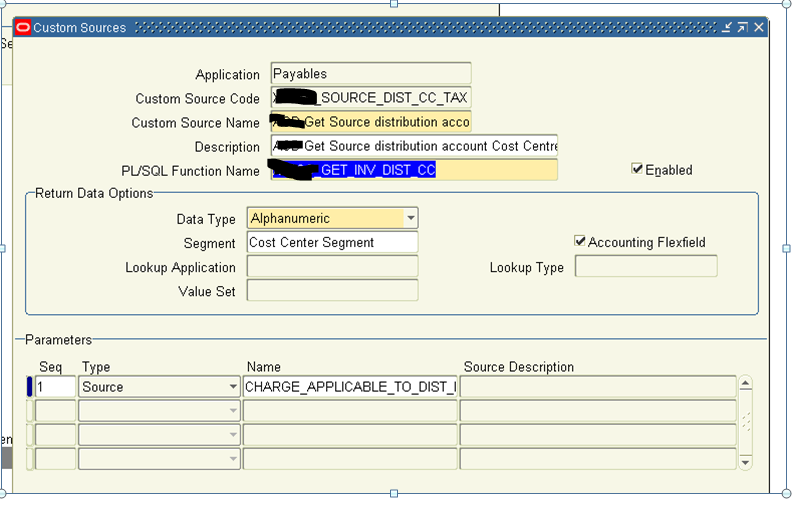
Enter the details of custom Source; Add PLSQL Function which will get the cost centre of the Line type = ITEM by passing parameter of source Invoice distribution id (CHARGE_APPLICABLE_TO_DIST_ID) from Invoice Tax line
Return value will be validated against the Cost Centre segments.
Click Save.
Defining the Account Derivation Rules

Click on New

Enter the details
Source value - Get Source distribution account CC for REC_TAX (Created in pervious step)

Defining the Journal Lines Definitions
Navigation: Payable Manager > Setup> Accounting Setups > Subledger Accounting Setup > Accounting Methods Builder > Methods and Definitions > Journal Lines Definitions

Enter Event Class - Invoice and click on Find
We are using Encumbrance Accrual method, Select Definition code - ACCRUAL_INVOICES_ALL
And then click on Copy Definition button

Enter Definition Code - XX_ACCRUAL_INVOICES_ALL
Definition Name - Custom ACD Accrual, Invoice All
Description - Custom Academies - Accrual, Invoice All to change cost centre of TAX Account
Click on Done and Save


Navigate to Line Assignments Block, Scroll down to Journal Line Type - Recoverable Tax

Now Click on Account Derivation Rules block
Add the New Account Derivation rules created in pervious step
Click save

Repeat the same steps for
Event class - Debit Memos and Definition code - ACCRUAL_DEBIT MEMOS_ALL
Event class - Credit Memos and Definition code - ACCRUAL_CREDIT MEMOS_ALL
Defining the Application Accounting Definition:
Navigation: Payable Manager > Setup> Accounting Setups > Subledger Accounting Setup > Accounting Methods Builder > Methods and Definitions > Application Accounting Definitions

Query for AP_ENC_ACCRUAL and click Find

Copy the definition
Definition Code - XX_AP_ENC_ACCRUAL
Name - Custom Encumbrance Accrual
Description - Custom Encumbrance Accrual
Click Done
Click Save


Navigate to Event class block - Invoices
In Journal Line definition Assignments
Delete --> Accrual, Invoices All

Navigate to Event class block - Invoices
In Journal Line definition Assignments
Add --> Accrual, Invoices All

Do the same for Debit Memo and Credit Memo

Defining the Subledger Accounting Method:
Navigation: Payable Manager > Setup> Accounting Setup > Accounting Methods Builder > Methods and Definitions > Subledger Accounting Method

Since we use Encumbrance Accrual
Query for ENCUMBRANCE_ACCRUAL

Copy the Definitions
Method Code - XXACD_ENCUMBRANCE_ACCRUAL
Name - Custom ACD Accrual With Encumbrance
Description - Custom ACD Accrual With Encumbrance
Click Done

Now go and change the Payables - Accounting Definition to Custom ACD Encumbrance Accrual (As pervious created)
Click Save

Validate:
Submit the concurrent program - "Validate Application Accounting Definitions" to validate the SLA rules created now.
Please Note : All the Application Accounting definition has to be validated for SLA Rules to work

